Understand R versions and how to check what you have
Learn how to update your R/RStudio installation
Learn how to update R packages
16.1 Checking Versions and Updating
As packages and R continue to improve, new versions of R are released1. In R, major versions are released infrequently (i.e., 3.0.0 was released in April 2013 and 4.0.0 was released in April 2020), but minor versions are released more regularly (4.0.4 was released in February 2021 and 4.0.5 was released in March 2021).
At minimum it’s advisable to maintain and update to the most recent major version of R, as these often contain important security/programming changes. Depending on your workflow and package needs, it’s good practice to keep the most recent minor version as well, though it’s not uncommon to maintain multiple minor versions of R if your analyses or workflows depend on specific versions of a package.
16.1.1 Check your Version
An easy and quick way to check what version of R you have and the most recent available version is first to open R, type R.version, hit enter, and see what you get:
R.version
               _
platform       aarch64-apple-darwin20
arch           aarch64
os             darwin20
system         aarch64, darwin20
status
major          4
minor          5.2
year           2025
month          10
day            31
svn rev        88974
language       R
version.string R version 4.5.2 (2025-10-31)
nickname       [Not] Part in a Rumble
This command will return information about the R version your system is using, as well as some information specific to your operating system (os).
Next, visit the R CRAN website to see what the most recent version is. If you haven’t updated recently, go ahead and grab the most recent R version for your system and install it.
16.1.2 Check/Update
We can check our version of RStudio by going to the toolbar at the top of your RStudio window and clicking Help > Check for Updates. If you have the most recent version, there will be a message box letting you know as much. If not, RStudio will direct you to their webpage to download the most recent version.
16.2 Updating R Packages
As we use R more regularly for different tasks, it’s common to accumulate many R packages in our R library. Every package is maintained and updated on a different schedule than R and RStudio, and so as new functions and features are written, or bugs are fixed, packages will be updated intermittently. Some package maintainers do this regularly, others may do it sporadically. Either way, we will typically need to update packages semi-regularly.
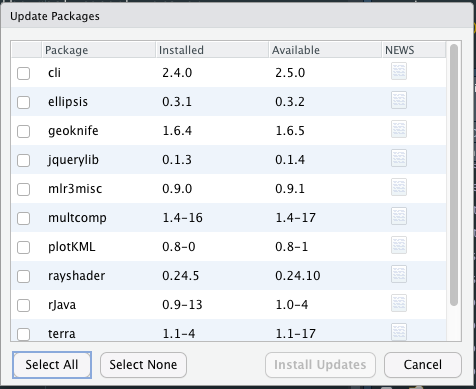
There are several methods of updating your R packages. If updating via RStudio, go to the toolbar at the top and select Tools > Check for Package Updates.... Depending on how many packages you’ve installed, and how recently you updated things, a window will appear saying either All packages up-to-date! or something that looks more like this:
Package update window
We can choose to Select All and update everything at once, or selectively update things.
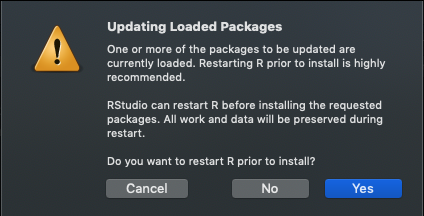
After we click Install Updates we may typically also see a message like this:
Restart R
You can choose to cancel, but it’s fine to click Yes and proceed. Sometimes we will also get something in the Console that will ask the following:
Do you want to install from sources the packages which need compilation? (Yes/no/cancel)
Some packages require this, so generally it’s okay to type Yes and hit enter to proceed. At this point we can wait and let R/RStudio update things for us. Depending on how many packages are involved, this can take a few minutes. Importantly, when it’s all said and done, make sure there weren’t errors or issues with packages that didn’t get installed. We can use Tools > Check for Package Updates... again and see what packages remain, or if we get a message saying all packages are up-to-date.
For complete reproducibility for a project check out the renv package
Don’t copy packages over between R versions–start clean and fresh
Updating packages can be irksome, but it’s typically for the best. We advise updating your packages frequently if you regularly use R (e.g;, a weekly checks and updates to packages). If you want to be sure you have the exact package version for future use and reproducibility, the renv may be a great solution for an analysis or report, but may not be necessary if your aren’t using or working on a specific project/analysis. renv keeps a record of your R packages within an RProject down to the exact version number when you originally loaded these packages, and allows you to update this record as your project evolves over time.
Overall, treat R and R packages as something that will be highly functional with minimal but regular maintenance, like a vehicle that needs new tires or an oil change once in a while. This will keep things running smoothly over the long-term.
 Version